
Request a trial

Book a trial of A-DAPT: Advanced Video Forensics Software for Digital Evidence Analysis

Thank you!
Your submission has been received! We will be in touch shortly.
Oops! Something went wrong while submitting the form.

A-DAPT: Advanced Video Forensics Software for Digital Evidence Analysis

Advanced Digital Analysis and Processing Tool for Video and Audio

A-DAPT is a powerful software suite for the forensic analysis and export of multimedia evidence. It supports a wide range of file formats and enables investigators to review, convert, and clarify video efficiently, all while preserving evidential integrity. A-DAPT does not use FFmpeg which makes it a great tool to have to compare results from other tools that do use it.

State of the Art Video and Audio Analysis and Playback.
Proprietary Data Mining Code (Doesn't use external executables like FFprobe.exe or FFmpeg.exe for its processing and analysis.)
Comprehensive Analysis
Fast and Efficient
Detailed analysis reporting using easy to read charts and easy to understand explanations.
Multi-stream GOP structure analysis
Proprietary file support

What is A-DAPT?

A-DAPT (Advanced Digital Analysis and Processing Tool) is a powerful software platform developed by YottaGeek for the forensic analysis and processing of digital multimedia evidence. Designed specifically for law enforcement and legal professionals, A-DAPT allows users to review, process, and export multimedia files from sources such as CCTV, body-worn, smartphone, dashcam footage, in open formats and a wide range of proprietary formats. It simplifies complex workflows by offering a centralised environment for audio and video playback, clarification, and evidential export, all while maintaining full chain-of-custody integrity.

Why use A-DAPT?

A-DAPT streamlines the often complex and time-consuming process of working with digital multimedia files, enabling seamless playback and analysis without the need for native software. With built-in tools for video clarification, redaction, and evidential export, A-DAPT enhances both accuracy and efficiency. Whether you're managing large volumes of footage or preparing evidence for court, A-DAPT ensures your workflow is consistent, reliable, and fully compliant with legal standards.

Key Benefits of FilterGraph

Doesn't rely on third party code to playback video
Tools that use FFmpeg may not present you with all of the video frames, especially if they are damaged or in a format it doesn't understand.

A-DAPT is useful when it is critical to review all of the frames or at the very least be aware that they are there, use it to validate or question the processing of other video tools.

Clarify and export with forensic accuracy
Apply video enhancements and export evidence-ready footage using standardised, court-compatible formats.

Streamline complex workflows
Manage the entire video evidence process, from acquisition to review and redaction, within a single, intuitive interface.

laptop open with cyber security written on the screen

How A-DAPT Helps

A-DAPT simplifies the complexities of digital multimedia evidence by giving investigators a reliable, unified platform for processing footage. It eliminates the need to juggle multiple tools or rely on proprietary playback software, reducing delays and the risk of error.

Whether you're:

  • A police officer reviewing multimedia from different sources.
  • A legal professional preparing footage for court in a compliant and tamper-proof format.
  • A forensic analyst detailed analysis of file content even frame-damaged video
  • A regulator or investigator needing to highlight salient points in audio and video.

A-DAPT streamlines every step, from acquisition and clarification to export and reporting. It helps you work faster, with more confidence, while maintaining the evidential integrity required in professional investigations.

What Can A-DAPT Do?

A-DAPT offers a complete toolkit for handling digital multimedia evidence from start to finish. Its capabilities include:

  • Multi-format video playback
    Seamlessly play multimedia files including proprietary and omf formats
  • Video clarification tools
    Enhance image clarity, correct distortion, and extract key visual details from poor-quality footage.
  • Frame-by-frame analysis
    Review critical moments with precision, ensuring no detail is missed during examination.
  • Still image and clip export
    Capture stills or clips in standardised formats suitable for evidential use or courtroom presentation.
  • Redaction and Highlighting
    Obscure sensitive visuals or annotate and highlight salient details.
  • Evidential logging and reporting
    Maintain a full audit trail with time-stamped logs, ensuring every action is recorded for legal compliance.
  • Frame Rate Validation
    Cross-checks container header fps against derived frame-level fps — highlights mismatches, generates frequency graph over the full duration
  • GOP Analysis
    Full I/P/B frame map across all streams simultaneously — flags anomalous frames, non-standard sequences, and re-encode boundaries
  • Timeline View
    Gantt chart across multiple sources — automatically flags gaps and overlaps with exact duration displayed
  • Compare In/Out
    Pixel-level RGB difference map between any two marked frames — white = difference, black = identical — detects sub-pixel manipulation
  • Milestone Marker
    Set any frame as time-zero — timeline displays ±offset for collision reconstruction and event sequencing
  • Audio Waveform
    Full waveform with live scrubbing — set audio markers, correlate to video frames, export for reporting
  • Analysis Report
    Fully customizable PDF — MD5/SHA1/SHA256/SHA512 hashes, thumbnails, hex headers, frame rate graphs, macroblock analysis, motion vectors
  • Concatenate
    Lossless stream linking — no re-encoding, original GOP structures and all metadata fully preserved
  • Archive & Restore
    Full project packaging with MD5 hash verification on restore — colour-coded results (green = match, red = mismatch)
  • Metadata Report
    Critical fields in bold blue, anomalous data in red — container, streams, statistics, GPS location, and vendor-specific headers

How can I analyse video without FFmpeg?

A‑DAPT is a forensic video analysis tool built on a fully proprietary parsing engine with no black-box dependencies. Because it does not rely on wrappers around FFprobe, FFmpeg, or other metadata parsers, you can directly compare its results against your existing tools to strengthen the confidence of your findings. It uses open-source libraries as DLLs only, maintaining strict LGPL compliance. This design gives you a transparent, defensible foundation for your analysis—one you can clearly explain and stand behind in court.

Tools like VLC and some other forensic tools use FFmpeg which is designed to try and play your multimedia file even though it may drop some frames to do so, A-DAPT can report on the whole stream and report any broken or damaged sequences.
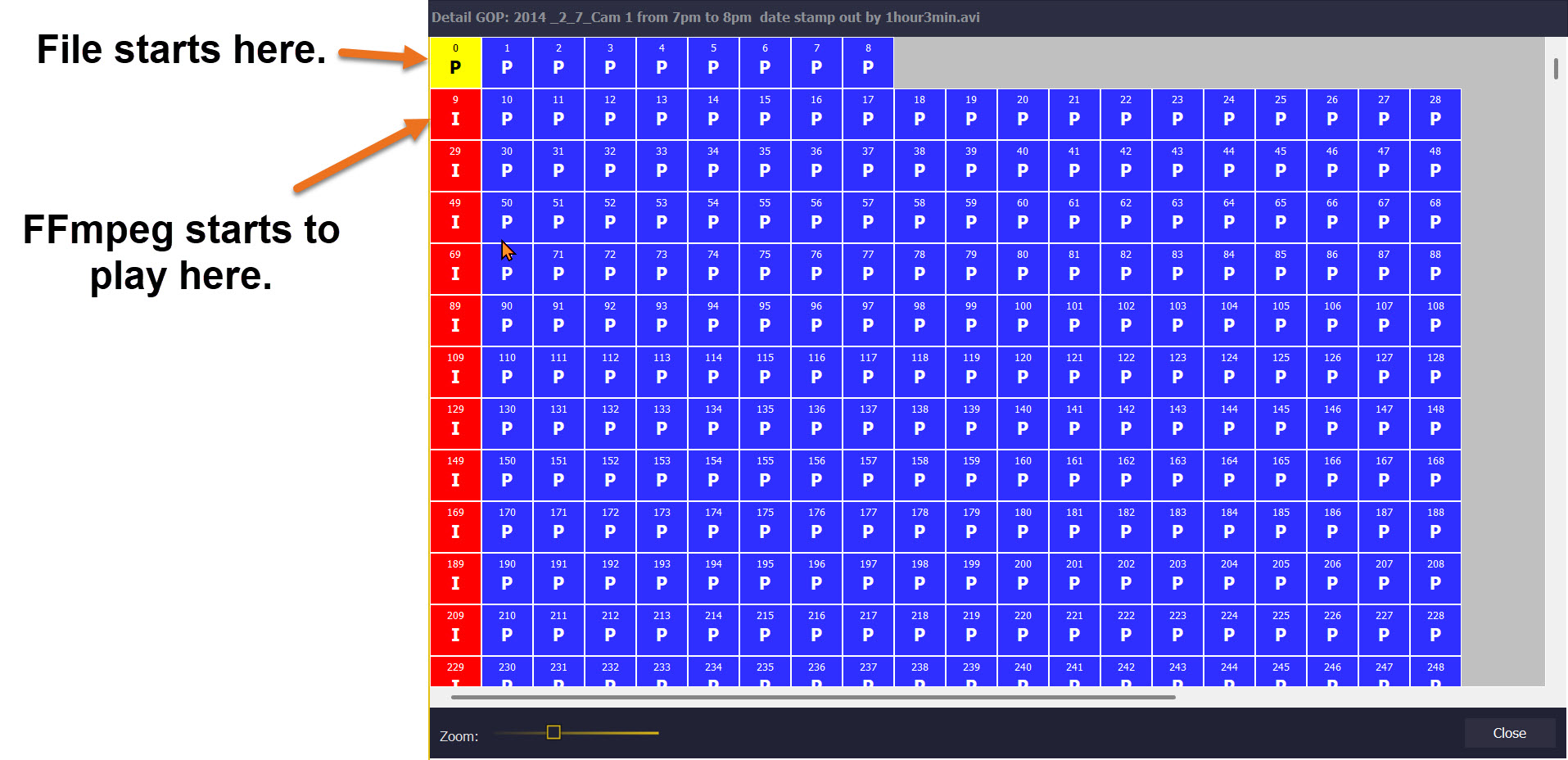
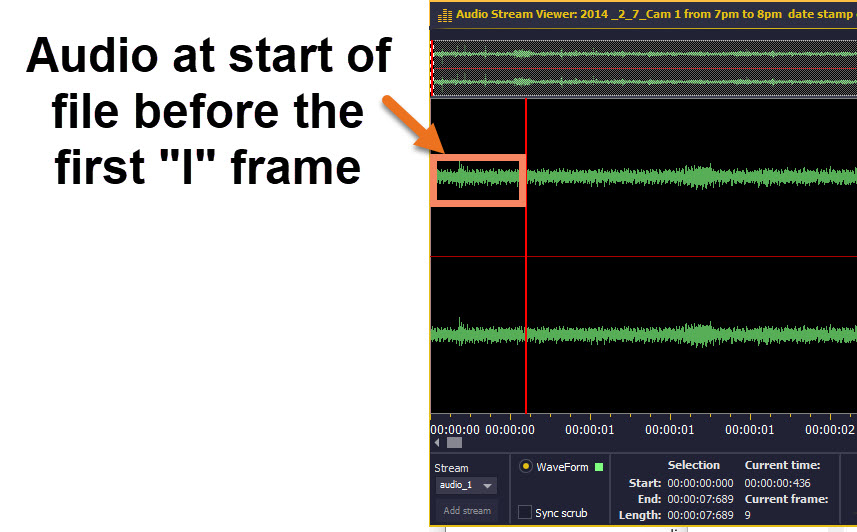
A-DAPT doesnt rely on FFmpeg and includes all frames
This multimedia file has an audio stream, that starts at frame "0" but FFmpeg pushes the start of the audio to the first I frame making it out of sync and the file duration incorrect.

A-DAPT makes sure that audio stays in sync
The audio stream should start at frame "0" but FFmpeg will push it to start at frame "9"

FFmpeg doesnt start the frame order until the first "I" frame.
FFmpeg sets the first "I" frame as frame "0"

The total number of frames that FFmpeg reports as playable is 71680 whereas A-DAPT reports 71700. Although those 20 frames  may not have any content that can be visualised those 20 frames may be relevant if you are carrying out timing calculations or want the audio to be in sync. (FFmpeg discounted the "P" frames 0 through to 8 plus some others with macroblock encoding issues)

Changelogs

If you require any changelogs from older dates which arent currently visable, please contact info@demux.co.uk.

A-DAPT Version 1.5.1.10
A-DAPT Version 1.5.1.9
A-DAPT Version 1.5.1.8
A-DAPT Version 1.5.1.7
A-DAPT Version 1.5.1.6
A-DAPT Version 1.5.1.3
A-DAPT Version 1.5.1.2
A-DAPT Version 1.5.1.0
A-DAPT Version 1.5.0.41
A-DAPT Version 1.5.0.39
A-DAPT Version 1.5.0.37
A-DAPT Version 1.5.0.35
A-DAPT Version 1.5.0.34
A-DAPT Version 1.5.0.33
A-DAPT Version 1.5.0.31
A-DAPT Version 1.5.0.27
A-DAPT Version 1.5.0.25
A-DAPT Version 1.5.0.21
A-DAPT Version 1.5.0.20
A_DAPT Version 1.5.0.16
A-DAPT Version 1.5.0.15
A-DAPT Version 1.5.0.6
A-DAPT Version 1.5.0.5
African american employee uses surveillance footage to monitor traffic
Contact Us

To find out more...

Thank you!
Your submission has been received!
Oops! Something went wrong while submitting the form.
