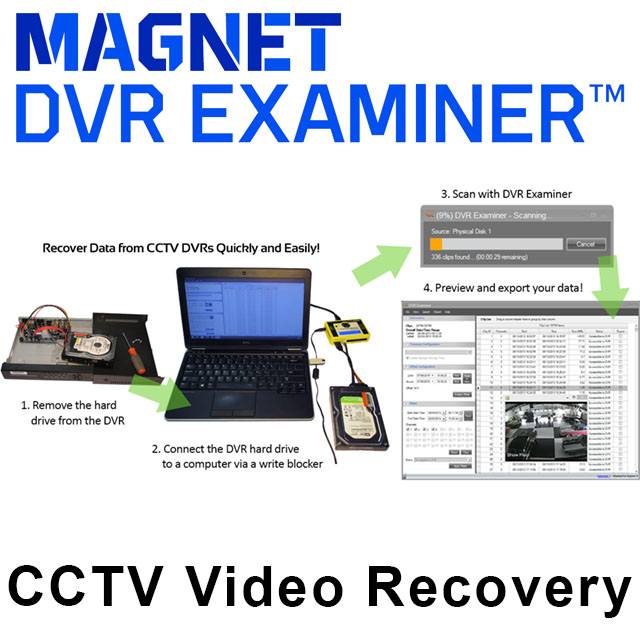
DVR Examiner is a forensic video recovery tool that allows investigators to extract video footage directly from DVR hard drives — even if the system is damaged, password-protected, or non-functional. Developed by Magnet Forensics, it bypasses traditional DVR interfaces to access and recover video files, including deleted clips, while maintaining evidential integrity. It’s an essential solution for cases where standard DVR access is impossible or unreliable.
DVR Examiner is trusted by digital forensic professionals, law enforcement agencies, and private investigators who need to recover video evidence from CCTV systems. Typical users include:
It’s the go-to solution when traditional DVR access fails — ensuring no critical footage is left behind.

Traditional DVR systems can be unreliable, restricted, or even completely inaccessible — especially in time-sensitive investigations. DVR Examiner allows professionals to recover video evidence directly from the source, bypassing login credentials and proprietary interfaces. This eliminates costly delays and ensures that no critical footage is missed, even if it’s been deleted or hidden. It’s a dependable solution that gives investigators control when they need it most.
DVR Examiner simplifies one of the most challenging parts of a forensic video investigation: recovering footage from systems that won’t cooperate. Whether the DVR is damaged, encrypted, or incompatible with standard tools, DVR Examiner can extract and preserve valuable evidence directly from the drive. It reduces reliance on third-party vendors, speeds up your workflow, and provides legally defensible results — all in a few clicks.
Q: What is Magnet DVR Examiner?
A: Magnet DVR Examiner was a specialist forensic tool for recovering video footage directly from CCTV DVR hard drives, reading and reconstructing the data even without a working DVR unit available.
Q: Is Magnet DVR Examiner being discontinued?
A: Yes. Magnet Forensics is retiring Magnet DVR Examiner by the end of 2026. Its DVR and CCTV recovery capability has been carried forward into Magnet WITNESS, which is now the designated successor product.
Q: What happens to my existing Magnet DVR Examiner licence?
A: Contact DEMUX directly to discuss your migration path to Magnet WITNESS. We'll help make sure your investigative capability continues without interruption ahead of Magnet DVR Examiner's retirement.
Q: Can Magnet WITNESS still recover footage from CCTV DVR hard drives?
A: Yes. Magnet WITNESS fully retains Magnet DVR Examiner's core capability, directly acquiring data from surveillance and CCTV DVR hard drives, including footage that has been deleted or partially overwritten.
Q: Why is Magnet WITNESS considered an upgrade over Magnet DVR Examiner?
A: Magnet WITNESS builds on DVR Examiner's DVR-only recovery by supporting a much wider range of video sources, including body cams, mobile devices, drones, dash cams, and cloud-based surveillance systems, all reviewed within one unified platform rather than a single-purpose DVR tool.
Q: Does Magnet WITNESS produce the same court-ready reports as Magnet DVR Examiner?
A: Yes, and more. Magnet WITNESS automatically generates auditable reports for every video input and output, and produces a court-ready report and concatenated video that plays on any computer, extending beyond what DVR Examiner originally offered.
Q: Should I start new investigations in Magnet WITNESS instead of Magnet DVR Examiner?
A: Yes. With Magnet DVR Examiner reaching end of life, Magnet WITNESS is the recommended tool for all new DVR and CCTV recovery work, giving you the same core recovery capability plus support for a far broader range of video evidence sources.
If you require any changelogs from older dates which arent currently visable, please contact info@demux.co.uk.
What's New panel on start page includes DVR Examiner End of Sale (EOS) and End of Life (EOL) Notice
New Features:-
Added filesystem AlrmRecFolder (Roku Camera)
Added filesystem EQVPSI (formerly ATS200026)
Added filesystem GniMedia (formerly ATS220038)
Added filesystem OPENFAT (Asanti Camera)
Filesystem Improvement: Enable Watchdog Preview
Filesystem Improvement: LVF add Inaccessible scan
New Features:
- Added filesystem MEDIAFOLDER (Hugolog HU-PWG3-5G)
Bug fixes:
- Resolved an issue with clip status changing to unknown after clip has been exported. MMP-1668
New Features:
- Added support for ATS220009/ATS190029 as TDFS filesystem
- Added support for ATS170084 as BJPEG filesystem
- Refactored QVFS filesystem
Bug fixes:
- DHFS_41 scan would immediately fail. MAP-1092 | VFSE-148
- Some HIK clips failed to export. -MAP1090 | VFSE-146
- WFS scan would immediately fail. -MAP-1093 | VFSE-151
New Features:
- Added support for ATS220008/VRM000298 as Msp4i
Bug fixes:
- Resolved an issue where ICATCH_264 filesystem was not recovering all data. VFSE-105
- Resolved and issue where some clips failed to export due to no reference frames. VFSE-146
- Added support for filesystem variant MFSDos. VFSE-138
- Resolved an issue with failed scans of DHFS-41 filesystems. VFSE-148
New Features:
- Added support for ATS230015/VRM000293 as ReoFS filesystem
Bug fixes:
- Refactored the WFS filesystem and widened support across different partition signatures. -MAP-745
- Refactored the A9 filesystem for more accurate clip creation. -MAP-829
- Refactored the UWARE filesystem for more accurate clip creation. -MAP-831
- Resolved an issue with clips appearing corrupted from the HIK filesystem and improved clip reconstruction. -VFSE-134
- Resolved an issue with some UBV filesystem clips reporting an incorrect duration. -MAP-882
- Resolved an issue with the UWARE_L filesystem not returning all available clips. -VFSE-119
- Updated the WFS filesystem detection and added the ability to detect when WFS is on multiple partitions. -VFSE-128
- Updated the IFS filesystem to improve handling of unusual circumstances that may be encountered with the filesystem. -MAP-240
- Resolved an issue with DHFS_41 frame timestamps when bad frames are encountered. -MAP-651
- Improved DHFS_41 filesystem detections, allowing for more partition signatures. -VFSE-125
New Features:
- DHFS Performance Improvements
- Feature Stabilization - 5.2.X
- Added support for the following filesystems:
-Raysharp filesystem VRM000295 - MAP-704
-UBV filesystem VRM000300 -MAP-505
- Also referenced as ATS220008, ATS200039, ATS200040, and ATS200041.
- (Proprietary player for .ubv not available
- Inaccessible scan timestamp could be inaccurate due to DVR vendor implementation.
- Long duration clips may show inaccurate timestamps in the player.
New Features:
- Added support for ATS200007 as an IIDX variant
- Added support for ATS230009 as new filesystem Milefs
- Reduced memory footprint when performing inaccessible scans for filesystem HIK, HIKSql, Shfl, Xv4, Dhfs, Wfs, Ident, Jdat, BlueDC, H2MbDC, NvrDC, Rsfs, Asjs, RaySharp, Ssf
Bug fixes:
- Addressed issue causing Dvr_264_X to detect only
- Addressed issue causing some UAVTech filesystems to return 0 clips
- Addressed issue causing some H2MB_DC filesystems to fail scan (VSFE-107)
- Addressed issue causing some HIK inaccessible scans to fail
- Addressed issue with some DMD filesytems failing to detect
New Features:
- Added support for JDAT filesystem
- Added support for XFS v5 filesystem
- Added support for new SSF filesystem variant
Bug Fixes:
- Resolved issue displaying clips of sources not selected in case explorer
- Resolved issue causing ASJS inaccessible scans to fail (VFSE-52)
- Resolved issue causing RSFS inaccessible scans to fail (VFSE-67)
- Resolved issue with DHFS sources encountering an error when attempting to truncate frames (VFSE-93, VFSE-94, VFSE-103)
- Resolved issue with DHFS scans not returning all clips (VFSE-102)
- Updated clip creation logic to create better organized clips that allow for quicker triaging. This will not change the amount of data retrieved but could change the number of clips.
- For accessible scans this could impact the following filesystems: Lst, Nafs1, Nafs1V2, Nafs2, Nafs2V2, Nafs4, Nafs4V2, Psf, PsfMsbf, Sdt, Ss, Ssf, Stfs, UuMpeg, Vdb.
- For inaccessible scans this could impact the following filesystems: Shfl, Dhfs, Wfs, Gaea, Hik, Ident, NoEfi, NoEfi2013, SzDc, BlueDc, H2MbDc, NvrDc, Mfs, MfsRef, Par, Asjs, Rsfs, Pop, RaySharp, Sdt, Ssf.
- Adjusted detection logic for DHFS filesystem detections to fix errant detections (VFSE-30)
- Resolved an issue with the parsing of clip data to find channel numbers in some filesystems (VFSE-83)
- Resolved an issue with ASJS accessible scans (VFSE-91)
- Resolved the root cause of an unhandled exception in HIK data scans (VFSE-104)
- Resolved issue with HIK_SQL scans not returning all data (VFSE-80)
New features:
Refactored HIK to improve performance and fix bugs
Added detection for ATS180099Bug
Fixes:
Resolved issue where SSF_x image was unable to be previewed or exported (VFSE-48)
New Features:
– Added support for Hik SQL filesystem (ATS230032)
– Refactored and consolidated filesystems SsfE, SsfX, SsfXhi, SsfXm into SSF filesystem
– Improved the accuracy of scan progress reporting
– Increased the information gathered from a sparse disk
– Refactored PSF, PSF_MSBF, SDT, STFS filesystems
– Added h265 wupport to the STL filesystem
– Combined ‘Generate Debug Data Files’ checkbox into the ‘Enable Debug Logging’ checkbox control in Application Settings
Implemented ATS170057 as filesystem Watchdog Refactored WFS, DHFS, Magic and IFS filesystem families
Bug fixes: